
Read data
library(tidyverse)
source("functions_features.R")
source("functions_plotting.R")
df_male <- nanoparquet::read_parquet(
"data/penalties_ws.parquet"
) |>
convert_opta_to_meters() |>
add_features() |>
filter(!is_female_league)After the descriptives of part 1, we turn to the statistical models. I came up with six questions that were of interest to me:
Sending keeper wrong way
Penalty taking skill
Penalty stopping skill
How good could the very best be?
Placement preference
Team selection quality
We model whether an on-target penalty is scored from the kicker’s foot and where the ball crosses the goal line:
\[ \begin{aligned} \text{Goal}_i &\sim \operatorname{Bernoulli}(p_i) \\ \operatorname{logit}(p_i) &= \beta_0 + \beta_1\,\mathbb{1}[\text{foot}_i = \text{Right}] + f_{\text{foot}_i}(x_i, y_i), \end{aligned} \]
where \((x_i, y_i)\) is where the ball crosses the goal line and \(f_{\text{Left}}\), \(f_{\text{Right}}\) are thin-plate spline surfaces fit separately per foot (the by = kick_foot term). The index \(i\) runs over on-target shots only — scored or saved — since shots that miss or strike the frame are deterministically no-goal and contain no placement information here.
library(tidyverse)
source("functions_features.R")
source("functions_plotting.R")
df_male <- nanoparquet::read_parquet(
"data/penalties_ws.parquet"
) |>
convert_opta_to_meters() |>
add_features() |>
filter(!is_female_league)# fit model
psxg_interaction <- brms::brm(
formula = is_goal ~ kick_foot +
s(shot_x_meters, shot_y_meters, by = kick_foot),
# only shots on goal: post and wide are deterministically no-goal here
data = df_male |> filter(outcome %in% c("Goal", "Saved")),
family = bernoulli(link = "logit"),
backend = 'cmdstanr',
cores = 4,
chains = 4,
file = "models/brms_psxg_interaction"
)
# prepare marginal effects calculation
x_range <- c(post_left, post_right)
y_range <- c(0, crossbar_height)
# n_y is a resolution parameter. the heatmap is a raster, so we sample the fitted
# surface on a grid of cells and colour each one. we could sample every cm of the
# goal (~730x240 cells), but there are two reasons not to. first, it buys nothing:
# s(x, y) is a *smooth* spline with no cm-scale detail to resolve, so a fine raster
# looks identical to a coarse one (and heatmaps read as smooth long before per-pixel
# resolution). second, it is expensive in a way the cell count hides: predictions()
# evaluates each cell on *every posterior draw* and then summarises -- that is what
# produces the credible interval -- so a cm grid with ~4000 draws is hundreds of
# millions of evaluations to hold in memory. 80 rows is smooth on screen while
# keeping that posterior summary cheap; bump n_y if you ever want it crisper.
#
# keep cells roughly square: the goal is ~3x wider than tall
n_y <- 80
n_x <- round(n_y * diff(x_range) / diff(y_range))
# evaluate at cell *centres* so the raster fills the goal frame exactly and
# doesn't bleed half a cell past the posts/line into the grass
cell_centres <- function(rng, n) {
edges <- seq(rng[1], rng[2], length.out = n + 1)
utils::head(edges, -1) + diff(edges) / 2
}
# calculate marginal effects
psxg_grid <- marginaleffects::predictions(
psxg_interaction,
newdata = marginaleffects::datagrid(
shot_x_meters = cell_centres(x_range, n_x),
shot_y_meters = cell_centres(y_range, n_y),
kick_foot = c("Left", "Right")
)
) |>
tibble::as_tibble() |>
dplyr::select(
kick_foot,
shot_x_meters,
shot_y_meters,
prob = estimate,
prob_lower = conf.low,
prob_upper = conf.high
)To turn the fitted model into a picture, we lay a grid of points across the goal and calculate the predicted scoring probability at each cell of the grid (each cell is a marginaleffects prediction (the posterior mean and its 95% credibility interval)). We do this separately for left- and right-footed takers.
library(plotly)
# reversed so red marks low goal probability (where you don't want to shoot)
pal_psxg <- rev(wesanderson::wes_palette(
"Zissou1Continuous",
100,
type = "continuous"
))
x_vals <- sort(unique(psxg_grid$shot_x_meters))
y_vals <- sort(unique(psxg_grid$shot_y_meters))
# reshape one foot's predictions into a z-matrix (rows = y, cols = x) plus a
# matching matrix of hover labels carrying the credible interval
foot_layer <- function(foot) {
d <- psxg_grid |>
dplyr::filter(kick_foot == foot) |>
dplyr::arrange(shot_y_meters, shot_x_meters)
to_mat <- function(v) {
matrix(v, nrow = length(y_vals), ncol = length(x_vals), byrow = TRUE)
}
list(
z = to_mat(d$prob),
text = to_mat(sprintf(
paste0(
"Goal probability: <b>%.1f%%</b><br>",
"95%% credible interval: %.1f%%–%.1f%%<br>",
"x: %.2f m y: %.2f m"
),
d$prob * 100,
d$prob_lower * 100,
d$prob_upper * 100,
d$shot_x_meters,
d$shot_y_meters
))
)
}
left <- foot_layer("Left")
right <- foot_layer("Right")
z_range <- range(psxg_grid$prob)
# colorbar ticks: pretty interior values, but always pin a tick at the data min
# and max so *both* ends of the scale are labelled (plotly's auto ticks label
# the top but not the minimum)
cb_tickvals <- {
interior <- pretty(z_range)
interior <- interior[interior > z_range[1] & interior < z_range[2]]
c(z_range[1], interior, z_range[2])
}
# reversed Zissou1 as a plotly colorscale (red = low probability)
colorscale <- Map(
function(i, col) list((i - 1) / (length(pal_psxg) - 1), col),
seq_along(pal_psxg),
pal_psxg
)
# goal frame, goal line and dive zones as static shapes
r <- diameter_post / 2
post_rect <- function(x_centre) {
list(
type = "rect",
layer = "above",
x0 = x_centre - r,
x1 = x_centre + r,
y0 = 0,
y1 = crossbar_height + r,
fillcolor = "black",
line = list(width = 0)
)
}
dive_line <- function(x) {
list(
type = "line",
layer = "above",
x0 = x,
x1 = x,
y0 = 0,
y1 = crossbar_height,
line = list(color = "gray50", width = 1, dash = "dash")
)
}
goal_shapes <- list(
post_rect(post_left),
post_rect(post_right),
list(
type = "rect",
layer = "above",
x0 = post_left - r,
x1 = post_right + r,
y0 = crossbar_height - r,
y1 = crossbar_height + r,
fillcolor = "black",
line = list(width = 0)
),
list(
type = "line",
layer = "above",
x0 = -(post_offset + 0.3),
x1 = post_offset + 0.3,
y0 = 0,
y1 = 0,
line = list(color = "darkgreen", width = 2)
),
dive_line(dive_zone_left_offset),
dive_line(dive_zone_right_offset)
)
heatmap_trace <- function(p, layer, visible) {
add_trace(
p,
x = x_vals,
y = y_vals,
z = layer$z,
text = layer$text,
type = "heatmap",
hoverinfo = "text",
visible = visible,
colorscale = colorscale,
zmin = z_range[1],
zmax = z_range[2],
colorbar = list(
title = list(text = "Goal probability", side = "top"),
tickformat = ".0%",
tickmode = "array",
tickvals = cb_tickvals,
orientation = "h",
x = 0.5,
xanchor = "center",
y = 1.05,
yanchor = "bottom",
thickness = 10,
len = 0.3,
lenmode = "fraction"
)
)
}
# a ball that follows the cursor
# so the hover doubles as a to-scale sense of how big the ball is in the goal. it
# is appended as the next shape after the goal frame and moved on hover via JS.
ball_shape_index <- length(goal_shapes)
ball_js <- paste0(
"function(el, x) {\n",
" var r = ",
ball_radius,
";\n",
" var idx = ",
ball_shape_index,
";\n",
" var ball = {type: 'circle', xref: 'x', yref: 'y',\n",
" x0: 0, x1: 0, y0: 0, y1: 0, visible: false, layer: 'above',\n",
" fillcolor: 'rgba(255,255,255,0.92)', line: {color: '#222222', width: 1.5}};\n",
" var init = {}; init['shapes[' + idx + ']'] = ball;\n",
" Plotly.relayout(el, init);\n",
" el.on('plotly_hover', function(d) {\n",
" var pt = d.points[0], u = {};\n",
" u['shapes[' + idx + '].x0'] = pt.x - r;\n",
" u['shapes[' + idx + '].x1'] = pt.x + r;\n",
" u['shapes[' + idx + '].y0'] = pt.y - r;\n",
" u['shapes[' + idx + '].y1'] = pt.y + r;\n",
" u['shapes[' + idx + '].visible'] = true;\n",
" Plotly.relayout(el, u);\n",
" });\n",
" el.on('plotly_unhover', function(d) {\n",
" var u = {}; u['shapes[' + idx + '].visible'] = false;\n",
" Plotly.relayout(el, u);\n",
" });\n",
"}"
)
# height is pinned in pixels: with the 1:1 scaleanchor lock, plotly otherwise
# stretches the y-range to fill a tall container, leaving huge empty bands above
# and below the (wide, short) goal. width stays responsive (out-width 100%).
plot_ly(height = 400) |>
heatmap_trace(left, visible = TRUE) |>
heatmap_trace(right, visible = FALSE) |>
layout(
title = list(
text = "Post-shot goal probability across the goal mouth",
y = 0.97,
yref = "container",
yanchor = "top",
x = 0.5
),
hovermode = "closest",
# symmetric l/r so the (centred) data area lines up under the centred title
margin = list(t = 95, b = 35, l = 45, r = 45),
xaxis = list(
title = "",
range = c(-(post_offset + 0.05), post_offset + 0.05),
zeroline = FALSE,
showgrid = FALSE,
constrain = "domain"
),
yaxis = list(
title = "",
range = c(-0.25, crossbar_height + 0.05),
zeroline = FALSE,
showgrid = FALSE,
scaleanchor = "x",
scaleratio = 1
),
shapes = goal_shapes,
updatemenus = list(list(
type = "buttons",
direction = "right",
x = 0.02,
xanchor = "left",
y = 1.05,
yanchor = "bottom",
buttons = list(
list(
method = "restyle",
label = "Left-footed",
args = list("visible", list(TRUE, FALSE))
),
list(
method = "restyle",
label = "Right-footed",
args = list("visible", list(FALSE, TRUE))
)
)
))
) |>
htmlwidgets::onRender(ball_js)There is, however, more to penalties than shooting. For example, there’s also the art of deceiving the goalkeeper on where you’re going to shoot, or perhaps waiting until the goalkeeper chooses a side himself – the only thing left to do then is to pass the ball into the other part of the goal.
Fortunately, we have information on what side the goalkeeper went and as such we can build a simple model of this skill by regressing whether the keeper went the wrong way on a taker and a goalkeeper random intercepts. The random intercepts are essential here as football and penalty taking is a very low frequency activity and this pools the information and thereby regularizes the estimates for each player and goalkeeper. Both the taker and keeper are modelled in the same model so that their skills are estimated simultaneously.
In math terms this means that for penalty \(i\) taken by \(\text{taker}[i]\) against \(\text{gk}[i]\),
\[ \begin{aligned} \text{WrongWay}_i &\sim \operatorname{Bernoulli}(p_i) \\ \operatorname{logit}(p_i) &= \beta_0 + u_{\text{taker}[i]} + v_{\text{gk}[i]} \\ u_j &\sim \operatorname{Normal}(0, \sigma^2_{\text{taker}}), \quad j = 1, \dots, J_{\text{taker}}, \\ v_k &\sim \operatorname{Normal}(0, \sigma^2_{\text{gk}}), \quad k = 1, \dots, K_{\text{gk}}. \end{aligned} \]
\(\beta_0\) is the global log-odds the keeper goes the wrong way; the crossed random intercepts \(u_j\) and \(v_k\) are each taker’s and each keeper’s deviation from this global term. Their shrinkage toward \(0\) is the regularisation we want: a player with a handful of penalties is pulled close to average, while the partial pooling lets a well-observed player move further out. The “added probability” we rank on is that deviation on the probability scale, \(\operatorname{logit}^{-1}(\beta_0 + u_j) - \operatorname{logit}^{-1}(\beta_0)\).
# --- Random-effect summaries from a brms binary GLMM ----------------------
# Helpers for summarising a single grouping factor in a logit model that has
# a global intercept and `(1 | group)` structure. They standardise the
# downstream column names (`base_prob`, `group_prob`, `added_prob`,
# `n_total`, `n_success`) so downstream plot/table code is reusable.
#' Posterior draws of a random effect's added probability.
#' Returns one row per draw per group level, with `added_prob =
#' plogis(b_Intercept + r_<group>) - plogis(b_Intercept)`.
extract_added_prob_draws <- function(model, group_col) {
re_param_name <- paste0("r_", group_col)
# spread_draws() uses its own NSE indexing grammar -- `r_<group>[<group>, ]`
# declares the index column to spread -- which the dplyr .data pronoun can't
# express, so this one argument is built with rlang. Everything downstream
# reads columns through .data[[ ]].
re_arg <- rlang::parse_expr(paste0(re_param_name, "[", group_col, ", ]"))
draws <- rlang::inject(
tidybayes::spread_draws(model, b_Intercept, !!re_arg)
)
draws |>
dplyr::mutate(
base_prob = plogis(b_Intercept),
group_prob = plogis(b_Intercept + .data[[re_param_name]]),
added_prob = group_prob - base_prob
)
}
#' Median of `plogis(b_Intercept)` over the posterior — a single
#' representative baseline probability for plot annotations.
compute_baseline_prob <- function(draws) {
draws |>
dplyr::ungroup() |>
dplyr::distinct(.draw, b_Intercept) |>
dplyr::summarise(p = stats::median(plogis(b_Intercept))) |>
dplyr::pull(p)
}
#' Per-group counts from the model frame (so levels match brms' R-name
#' format and any rows brms dropped don't poison the sums). Returns
#' `<group_col>`, `n_total`, `n_success`, with spaces in the group name
#' replaced by dots to match the random-effect names.
compute_group_counts <- function(model_data, group_col, outcome_col) {
model_data |>
dplyr::group_by(.data[[group_col]]) |>
dplyr::summarise(
n_total = dplyr::n(),
n_success = sum(.data[[outcome_col]]),
.groups = "drop"
) |>
dplyr::mutate(dplyr::across(
dplyr::all_of(group_col),
\(x) stringr::str_replace_all(x, " ", "\\.")
))
}
#' Summary stats (median, mean and 2.5/97.5% quantiles of added_prob)
#' joined with counts, plus a rank and display label. `sort_by` selects which
#' statistic the rows are arranged by; `desc` chooses the direction (1 = best).
compute_ranks <- function(
draws,
group_col,
counts_df,
sort_by = "median_added",
desc = TRUE
) {
ranks <- draws |>
dplyr::group_by(.data[[group_col]]) |>
dplyr::summarise(
median_added = stats::median(added_prob),
mean_added = mean(added_prob),
q025_added = stats::quantile(added_prob, probs = 0.025, names = FALSE),
q975_added = stats::quantile(added_prob, probs = 0.975, names = FALSE),
.groups = "drop"
) |>
dplyr::left_join(counts_df, by = group_col)
ranks <- if (desc) {
dplyr::arrange(ranks, dplyr::desc(.data[[sort_by]]))
} else {
dplyr::arrange(ranks, .data[[sort_by]])
}
# rank is the row's position in the sorted order (1 = best); surface it in the
# label so every row on the plot is tagged with its overall standing
ranks |>
dplyr::mutate(
rank = dplyr::row_number(),
label = sprintf(
"%d. %s (n = %d/%d, prop = %.0f%%)",
rank,
stringr::str_replace_all(.data[[group_col]], "\\.", " "),
n_success,
n_total,
100 * n_success / n_total
)
)
}
#' Build a small inline SVG "half-eye": a posterior density slab over a 95%
#' interval bar + median dot, all on a shared x-axis [xrange] so rows compare
#' directly. A dashed line marks 0 (average). `fill` colours the slab.
.dist_sparkline_svg <- function(values, xrange, fill, w = 130, h = 30) {
d <- stats::density(values, from = xrange[1], to = xrange[2], n = 64)
yn <- d$y / max(d$y) # normalise each slab to its own height
q <- stats::quantile(values, c(0.025, 0.5, 0.975), names = FALSE)
sx <- function(x) (x - xrange[1]) / diff(xrange) * w
top <- 3
slab_base <- h - 10
iv_y <- h - 5
sy <- function(t) slab_base - t * (slab_base - top)
curve <- paste(sprintf("%.1f,%.1f", sx(d$x), sy(yn)), collapse = " ")
parts <- c(
sprintf(
'<line x1="%.1f" y1="2" x2="%.1f" y2="%.1f" stroke="#aaa" stroke-width="0.7" stroke-dasharray="2,2"/>',
sx(0), sx(0), h - 2
),
sprintf(
'<polygon points="%.1f,%.1f %s %.1f,%.1f" fill="%s" fill-opacity="0.9" stroke="%s" stroke-width="0.6"/>',
sx(xrange[1]), slab_base, curve, sx(xrange[2]), slab_base, fill, fill
),
sprintf(
'<line x1="%.1f" y1="%.1f" x2="%.1f" y2="%.1f" stroke="#333" stroke-width="1.4"/>',
sx(q[1]), iv_y, sx(q[3]), iv_y
),
sprintf('<circle cx="%.1f" cy="%.1f" r="1.9" fill="#222"/>', sx(q[2]), iv_y)
)
sprintf(
'<svg width="%d" height="%d" viewBox="0 0 %d %d" xmlns="http://www.w3.org/2000/svg">%s</svg>',
w, h, w, h, paste(parts, collapse = "")
)
}
#' Three stacked panels (shared x-axis) summarising the spread of per-player
#' added-probability effects: a histogram of takers vs. goalkeepers on top, then
#' one boxplot per group with the best and worst `n_label` of each labelled.
plot_skill_distribution <- function(
taker_ranks,
gk_ranks,
x_label,
taker_name_col = "taker_name",
gk_name_col = "gk_name",
taker_fill = "#78B7C5",
gk_fill = "#E1AF00",
n_label = 3,
binwidth = 0.005
) {
prep <- function(ranks, name_col, role) {
ranks |>
dplyr::transmute(
role = role,
player = stringr::str_replace_all(.data[[name_col]], "\\.", " "),
median_added = median_added
)
}
takers <- prep(taker_ranks, taker_name_col, "Takers")
gks <- prep(gk_ranks, gk_name_col, "Goalkeepers")
combined <- dplyr::bind_rows(takers, gks)
combined$role <- factor(combined$role, levels = c("Takers", "Goalkeepers"))
fills <- c(Takers = taker_fill, Goalkeepers = gk_fill)
# shared x-range (probability units) so all three panels line up
xlim <- range(combined$median_added)
xlim <- xlim + c(-1, 1) * 0.05 * diff(xlim)
pp_axis <- ggplot2::scale_x_continuous(
labels = scales::label_number(scale = 100)
)
zero_line <- ggplot2::geom_vline(
xintercept = 0, linetype = "dashed", color = "gray50"
)
p_hist <- combined |>
ggplot2::ggplot(ggplot2::aes(median_added, fill = role)) +
ggplot2::geom_histogram(
binwidth = binwidth, position = "identity", alpha = 0.55
) +
zero_line +
pp_axis +
ggplot2::scale_y_continuous(expand = ggplot2::expansion(mult = c(0, 0.05))) +
ggplot2::scale_fill_manual(values = fills, name = NULL) +
ggplot2::coord_cartesian(xlim = xlim) +
ggplot2::labs(x = NULL, y = "Count") +
ggplot2::theme_minimal() +
ggplot2::theme(
panel.grid.minor = ggplot2::element_blank(),
panel.grid.major.x = ggplot2::element_blank(),
axis.text.x = ggplot2::element_blank(),
axis.ticks.x = ggplot2::element_blank(),
legend.position = "top",
legend.justification = "left"
)
# one boxplot per group, the best and worst `n_label` labelled; the group's
# name rides the (coloured) y-axis title so the two panels are easy to tell
# apart without leaning on the legend
box_panel <- function(d, role_fill, show_x) {
labelled <- dplyr::bind_rows(
dplyr::slice_max(d, median_added, n = n_label),
dplyr::slice_min(d, median_added, n = n_label)
)
ggplot2::ggplot(d, ggplot2::aes(x = median_added, y = 0)) +
# a normal boxplot: box + whiskers summarise the pack and the boxplot's
# own outliers are drawn as small neutral points; only the best and worst
# few -- labelled on top -- get the group's distinct colour
ggplot2::geom_boxplot(
width = 0.5,
fill = "gray90", color = "gray40", linewidth = 0.4,
outlier.color = "gray70", outlier.size = 0.8, outlier.alpha = 0.7
) +
ggplot2::geom_point(data = labelled, size = 1.5, color = role_fill) +
ggrepel::geom_text_repel(
data = labelled,
ggplot2::aes(label = player),
size = 3.3, direction = "both", nudge_y = 0.35,
force = 6, force_pull = 0.3, box.padding = 0.4, point.padding = 0.2,
segment.size = 0.3, segment.color = "gray50", segment.curvature = -0.1,
arrow = grid::arrow(length = grid::unit(0.006, "npc"), type = "closed"),
min.segment.length = 0.1, max.overlaps = Inf, seed = 42
) +
zero_line +
pp_axis +
ggplot2::coord_cartesian(xlim = xlim, ylim = c(-0.4, 1.6)) +
ggplot2::labs(x = if (show_x) x_label else NULL, y = unique(d$role)) +
ggplot2::theme_minimal() +
ggplot2::theme(
panel.grid.minor = ggplot2::element_blank(),
panel.grid.major.y = ggplot2::element_blank(),
axis.text.y = ggplot2::element_blank(),
axis.ticks.y = ggplot2::element_blank(),
axis.title.y = ggplot2::element_text(color = role_fill, face = "bold"),
axis.text.x = if (show_x) {
ggplot2::element_text()
} else {
ggplot2::element_blank()
},
axis.ticks.x = if (show_x) {
ggplot2::element_line()
} else {
ggplot2::element_blank()
}
)
}
patchwork::wrap_plots(
p_hist,
box_panel(takers, taker_fill, show_x = FALSE),
box_panel(gks, gk_fill, show_x = TRUE),
ncol = 1,
heights = c(4, 2, 2)
)
}
#' Interactive, sortable ranking table built from a compute_ranks() output and
#' its posterior `draws`. Each row shows an inline half-eye (density slab + 95%
#' interval) on a shared x-axis, slab-filled with a reversed Zissou1 colour
#' scaled to the player's median effect (blue = better than average, red =
#' worse; `higher_is_better = FALSE` flips this for goalkeepers). The exact
#' p2.5 / median / p97.5 numbers sit alongside. Shows `page_size` rows per page,
#' default-sorted best-first (first page = top 10); every numeric column is
#' sortable, so a reader can re-rank by the lower or upper bound.
table_re <- function(
ranks_df,
draws,
name_col,
effect_label = "Added probability vs. average",
rate_label = "Observed %",
count_label = "Made",
higher_is_better = TRUE,
baseline_prob = NULL,
page_size = 10,
accent = "#78B7C5"
) {
# shared x-axis covering every row's 95% interval and 0, lightly padded
xrange <- range(c(ranks_df$q025_added, ranks_df$q975_added, 0))
xrange <- xrange + c(-1, 1) * 0.04 * diff(xrange)
# reversed Zissou1, scaled symmetrically about 0 and oriented so "good" is
# always the blue end regardless of whether higher or lower is better
pal <- rev(wesanderson::wes_palette("Zissou1", 100, type = "continuous"))
sgn <- if (higher_is_better) 1 else -1
lim <- max(abs(ranks_df$median_added))
fill_for <- function(m) {
i <- round((sgn * m / lim + 1) / 2 * (length(pal) - 1)) + 1
pal[min(max(i, 1L), length(pal))]
}
# one inline half-eye SVG per group, from that group's posterior draws
svgs <- draws |>
dplyr::ungroup() |>
dplyr::group_by(.data[[name_col]]) |>
dplyr::summarise(
dist = .dist_sparkline_svg(
added_prob, xrange, fill_for(stats::median(added_prob))
),
.groups = "drop"
)
tbl <- ranks_df |>
dplyr::left_join(svgs, by = name_col) |>
dplyr::transmute(
rank = rank,
player = stringr::str_replace_all(.data[[name_col]], "\\.", " "),
kicks = n_total,
made = n_success,
# never-takers have n_total == 0; show a blank rate rather than NaN%
obs_rate = dplyr::if_else(n_total > 0, n_success / n_total, NA_real_),
dist = dist,
lo = q025_added,
mid = median_added,
hi = q975_added
)
# signed percentage formatter; the cell keeps the raw numeric value so the
# column still sorts numerically (reactable sorts on the data, not the label)
added_col <- function(header, bold = FALSE) {
reactable::colDef(
name = header,
# added_prob is a difference of two probabilities, so its unit is
# percentage points, not percent
cell = function(value) sprintf("%+.1f pp", 100 * value),
align = "right",
# wide enough that the header keeps its sort arrow on one line
minWidth = 90,
style = if (bold) list(fontWeight = 600) else NULL
)
}
# size a numeric column to its header text plus room for the sort arrow, so
# the header (see defaultColDef) stays on one line without making the column
# wider than its longest label needs -- short-label tables would otherwise
# carry so much dead width the whole table overflows into a horizontal scroll
header_width <- function(label, floor = 56) {
max(floor, round(nchar(label) * 7.5) + 30)
}
tbl_widget <- reactable::reactable(
tbl,
defaultSorted = list(rank = "asc"),
defaultPageSize = page_size,
showPageSizeOptions = TRUE,
pageSizeOptions = sort(unique(c(page_size, 10, 25, 50, 100))),
searchable = TRUE,
resizable = TRUE,
highlight = TRUE,
compact = TRUE,
# keep every header (and the sort arrow reactable injects into it) on one
# line rather than letting it wrap onto a second row
defaultColDef = reactable::colDef(
headerStyle = list(whiteSpace = "nowrap")
),
columnGroups = list(
reactable::colGroup(
name = paste0(effect_label, " (95% CrI)"),
columns = c("dist", "lo", "mid", "hi")
)
),
columns = list(
rank = reactable::colDef(
name = "#", width = 60, align = "right",
style = list(whiteSpace = "nowrap")
),
player = reactable::colDef(name = "Player", minWidth = 160),
kicks = reactable::colDef(
name = "Kicks", width = header_width("Kicks"), align = "right"
),
made = reactable::colDef(
name = count_label, width = header_width(count_label), align = "right"
),
obs_rate = reactable::colDef(
name = rate_label,
format = reactable::colFormat(percent = TRUE, digits = 0),
width = header_width(rate_label),
align = "right"
),
dist = reactable::colDef(
name = "Distribution",
html = TRUE,
sortable = FALSE,
align = "center",
minWidth = 150
),
lo = added_col("p2.5"),
mid = added_col("Median", bold = TRUE),
hi = added_col("p97.5")
),
theme = reactable::reactableTheme(
highlightColor = "#eef6f8",
headerStyle = list(borderBottom = paste0("2px solid ", accent))
)
)
if (is.null(baseline_prob)) {
return(tbl_widget)
}
htmltools::browsable(htmltools::tagList(
tbl_widget,
htmltools::tags$div(
style = "font-size: 0.8rem; color: #666; margin-top: 0.4rem;",
htmltools::HTML(sprintf(
"Dotted line: the average, a baseline rate of %s.",
scales::percent(baseline_prob, accuracy = 1)
))
)
))
}m_wrong_way <- brms::brm(
formula = gk_wrong_way ~ 1 + (1 | taker_name) + (1 | gk_name),
data = df_male,
family = brms::bernoulli(link = "logit"),
backend = "cmdstanr",
chains = 4,
cores = 4,
seed = 2026,
file = "models/brms_wrong_way_skill"
)
draws_taker_ww <- extract_added_prob_draws(m_wrong_way, "taker_name")
draws_gk_ww <- extract_added_prob_draws(m_wrong_way, "gk_name")
baseline_prob_ww <- compute_baseline_prob(draws_taker_ww)
taker_counts_ww <- compute_group_counts(
m_wrong_way$data,
"taker_name",
"gk_wrong_way"
)
gk_counts_ww <- compute_group_counts(
m_wrong_way$data,
"gk_name",
"gk_wrong_way"
)
# higher added_prob = more often deceives the GK = better deceiver
taker_ranks_ww <- compute_ranks(
draws_taker_ww,
"taker_name",
taker_counts_ww,
desc = TRUE
)
# lower added_prob = goes the wrong way less often = better at reading
gk_ranks_ww <- compute_ranks(
draws_gk_ww,
"gk_name",
gk_counts_ww,
desc = FALSE
)table_re(
taker_ranks_ww,
draws_taker_ww,
"taker_name",
effect_label = "Added wrong-way probability vs. average",
rate_label = "Wrong-way %",
count_label = "Wrong-way",
baseline_prob = baseline_prob_ww
)At the top of this list we see players with a small stutter like Lewandowski and Bruno Fernandes. The very best, however, Max Kruse, manages to wait and misdirect the keeper without a noticeable stutter even!
Messi, for all his body feints in open play, is not great at misdirecting the goalkeeper in penalties – he ranks 5559 out of 5934, sending goalkeepers the wrong way only 52% of the time!
table_re(
gk_ranks_ww,
draws_gk_ww,
"gk_name",
effect_label = "Added wrong-way probability vs. average",
rate_label = "Wrong-way %",
count_label = "Wrong-way",
higher_is_better = FALSE,
baseline_prob = baseline_prob_ww
)You can also use this table to find goalkeepers that often dive the correct way, but still fail to save the penalties. They either wait too long or are just bad at stopping the ball (or are just unlucky).
plot_skill_distribution(
taker_ranks_ww,
gk_ranks_ww,
x_label = "Added wrong-way probability vs. average (pp)"
)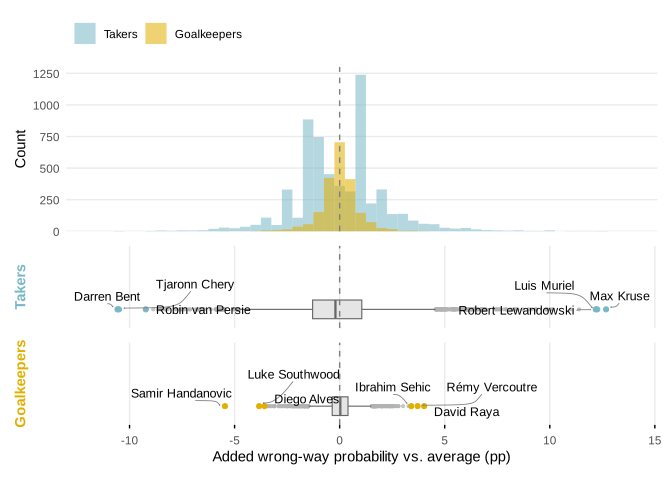
Note how much wider this skill distribution is for penalty takers than for goalkeepers.
Now, modeling all skills from the bottom up is hard as you then need to identify each of the skills that go into penalty taking. Even if you were able to write down all skills that go into this, you would also need the data on these skills. However, we do not have data on, for example, the speed at which the ball travels and I expect many of the skills to be latent. Therefore, I opt to model the skill from the top down. The model is very similar as before:
\[ \begin{aligned} \text{Goal}_i &\sim \operatorname{Bernoulli}(p_i) \\ \operatorname{logit}(p_i) &= \beta_0 + u_{\text{taker}[i]} + v_{\text{gk}[i]} \\ u_j &\sim \operatorname{Normal}(0, \sigma^2_{\text{taker}}), \quad j = 1, \dots, J_{\text{taker}}, \\ v_k &\sim \operatorname{Normal}(0, \sigma^2_{\text{gk}}), \quad k = 1, \dots, K_{\text{gk}}. \end{aligned} \]
It is the same crossed random-intercept structure as the wrong-way model, the outcome now being whether the penalty was scored: \(u_j\) is taker \(j\)’s scoring skill and \(v_k\) is keeper \(k\)’s effect on it (a better stopper pushes the probability down), each relative to the global log-odds \(\beta_0\).
m <- brms::brm(
formula = is_goal ~ (1 | taker_name) + (1 | gk_name),
data = df_male,
family = brms::bernoulli(link = "logit"),
backend = "cmdstanr",
chains = 4,
cores = 4,
seed = 2026,
file = "models/brms_penalty_skill"
)It’s a deliberately simple model: we do not take possible differences in context between penalty histories from players into account. So no information on derbies, knock-out, shootouts, chance to go ahead etc. – just the taker, the goalkeeper, and whether the penalty was scored. Note that the outcome is whether the taker scored, not whether the keeper saved. Part of a keeper’s skill may be unsettling the taker into missing the target altogether, and modelling “scored” lets the keeper take credit for that too.
library(tidybayes)
draws_taker <- extract_added_prob_draws(m, "taker_name")
draws_gk <- extract_added_prob_draws(m, "gk_name")
baseline_prob <- compute_baseline_prob(draws_taker)
taker_counts <- compute_group_counts(m$data, "taker_name", "is_goal")
gk_counts <- compute_group_counts(m$data, "gk_name", "is_goal")
# higher added_prob = more likely to score = better taker
taker_ranks <- compute_ranks(
draws_taker,
"taker_name",
taker_counts,
desc = TRUE
)
# lower added_prob = fewer goals conceded = better gk
gk_ranks <- compute_ranks(draws_gk, "gk_name", gk_counts, desc = FALSE)table_re(
taker_ranks,
draws_taker,
"taker_name",
effect_label = "Added scoring probability vs. average",
rate_label = "Scored %",
count_label = "Scored",
baseline_prob = baseline_prob
)Harry Kane stands out as the best penalty taker in the dataset by a considerable margin. Remarkably, he missed one of the highest-profile penalties in his career when he blazed his penalty over the top thereby failing to equalize for England versus France in the 2022 World Cup quarter-final.
We can also see exactly why Thomas Tuchel brought a striker playing in the Saudi League into the squad: Ivan Toney ranks as an exceptionally strong penalty taker.
Interestingly, for only 3 players, the credibility interval excludes 0. This starkly demonstrates just how many penalties this model requires to establish absolute certainty about a player’s skill level.2 It is almost hard to believe that we can confidently label so few players as “above average,” which may suggest the need for a more comprehensive model that includes e.g. the wrong-way and PSxG to increase the statistical signal of each kick.
Finally, it is also worth noting that the uncertainty in estimated skill is bigger for the worst takers because – of course – their environment picks up on their perceived ability and they won’t be the designed penalty taker for their team for long – preventing the accumulation of many penalties across their career. Switching penalty takers is cheap.
plot_skill_distribution(
taker_ranks,
gk_ranks,
x_label = "Added scoring probability vs. average (pp)"
)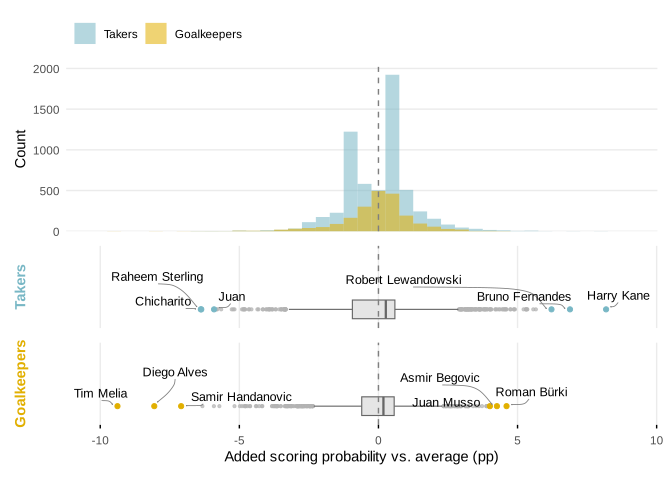
Takers (blue) and goalkeepers (gold) on the same scale. Both groups bunch tightly around the average once the sparsely-observed are shrunk toward it; only a handful – the proven specialists and the likely liabilities – pull away.
table_re(
gk_ranks,
draws_gk,
"gk_name",
effect_label = "Added scoring probability vs. average",
rate_label = "Conceded %",
count_label = "Conceded",
higher_is_better = FALSE,
baseline_prob = baseline_prob
)Among active goalkeepers, Bart Verbruggen ranks 2061 of 2083 (+2.9 pp, 95% CrI -4.4 to +9.2) and Robin Roefs 141 of 2083 (-1.9 pp, 95% CrI -11.6 to +5.3).
Perhaps we should do a goalkeeper substitution again with the 3rd Dutch GK looking very, very promising while the starting goalkeeper looks to be quite bad.3
# posterior of the taker-skill SD together with the intercept, so the derived
# tail quantities are proper posteriors rather than plug-in point estimates
tail_draws <- spread_draws(m, b_Intercept, sd_taker_name__Intercept) |>
mutate(
p999_prob = plogis(b_Intercept + qnorm(0.999) * sd_taker_name__Intercept),
p999_added = p999_prob - plogis(b_Intercept)
)
sd_taker <- median(tail_draws$sd_taker_name__Intercept)
p999 <- median(tail_draws$p999_prob)
p999_added <- median(tail_draws$p999_added)
# a Bernoulli kick carries ~p(1-p) Fisher information on the logit scale; the
# population prior is worth 1/sd^2 of it. Equating the two gives the career
# length at which a taker's own record equals the weight of the prior.
info_per_kick <- baseline_prob * (1 - baseline_prob)
n_equal <- 1 / (sd_taker^2 * info_per_kick)
n_takers <- nrow(taker_ranks)
# the tail run in reverse: how rare would a taker with a given *true*
# conversion rate be under the fitted skill distribution?
one_in_taker <- function(conv) {
z_draws <- with(
tail_draws,
(qlogis(conv) - b_Intercept) / sd_taker_name__Intercept
)
# upper tail directly (not 1 - pnorm), so the far tail doesn't get destroyed
# by floating-point cancellation near 1
one_in_draws <- 1 / pnorm(z_draws, lower.tail = FALSE)
tibble(
z = median(z_draws),
one_in = median(one_in_draws),
one_in_lo = quantile(one_in_draws, 0.025, names = FALSE),
one_in_hi = quantile(one_in_draws, 0.975, names = FALSE)
)
}
rare95 <- one_in_taker(0.95)
rare98 <- one_in_taker(0.98)
# how much of that rarity is the normal-tail assumption rather than the data?
# read the same tail off Student-t skill distributions matched to the same SD
one_in_taker_t <- function(conv, nu) {
t_draws <- with(
tail_draws,
(qlogis(conv) - b_Intercept) /
(sd_taker_name__Intercept * sqrt((nu - 2) / nu))
)
median(1 / pt(t_draws, df = nu, lower.tail = FALSE))
}
rare95_t5 <- one_in_taker_t(0.95, nu = 5)
rare98_t5 <- one_in_taker_t(0.98, nu = 5)
rare95_t3 <- one_in_taker_t(0.95, nu = 3)
top_taker <- taker_ranks |> slice(1)
top_taker_nm <- str_replace_all(top_taker$taker_name, "\\.", " ")
most_kicks <- taker_ranks |> slice_max(n_total, n = 1, with_ties = FALSE)
most_kicks_nm <- str_replace_all(most_kicks$taker_name, "\\.", " ")
n_above_equal <- sum(taker_ranks$n_total > round(n_equal))
# share of the posterior weight the prior still holds at the biggest career
prior_weight_biggest <- n_equal / (n_equal + most_kicks$n_total)
# and the standard error of a raw conversion rate over that career
se_raw_biggest <- sqrt(info_per_kick / most_kicks$n_total)
# winner's-curse exhibit: the best raw record among semi-regular takers
best_raw <- taker_ranks |>
filter(n_total >= 20) |>
mutate(raw_rate = n_success / n_total) |>
slice_max(raw_rate, n = 1, with_ties = FALSE)
best_raw_nm <- str_replace_all(best_raw$taker_name, "\\.", " ")You may find it hard to believe that the best penalty takers seemingly increase the conversion rate by only +8.2 pp over the average taker (which amounts to 85% with our 77% baseline). It is indeed hard to believe! Fortunately, it’s not true. Our model simultaneously believes that true ≈ 89% takers exist, and the top skill estimates in our dataset are only +8.2 pp. This is because our multilevel model is extremely honest about what it can identify for each player, and is essentially saying that while such a player is very likely to exist in our dataset, it can’t confidently say which one it is. This is also demonstrated by the 95% credible intervals; a few do include the possibility that they are a 89% taker! So don’t conflate the question of “who is the best taker, and what is our best estimate of their skill?” with “how good are the best takers?”. Now, how can we determine the skill level of the best takers?
We can simply use the between-taker variance – \(\sigma_{\text{taker}} =\) 0.29 logits – to infer what the 99.9th percentile of true skill looks like as this variance is a statement about the population: \(\operatorname{logit}^{-1}(\beta_0 + 3.09\,\sigma_{\text{taker}}) \approx\) 89% (+12.2 pp above average). With 5,934 takers in the data, the model expects roughly 6 of them to be at that level or better. So it is convinced such takers exist – it just can’t tell you who they are!
The plot below puts the answers to the two questions next to each other. The wide curve is the distribution of true skill the model believes exists in the population (one thin line per posterior draw of \(\beta_0\) and \(\sigma_{\text{taker}}\)); the narrow spike is everything it is willing to attribute to the 5,934 individual takers after shrinkage. (The spike’s twin peaks are the 2,317 one-kick takers: missing or scoring your only career penalty moves your skill estimate by barely a percentage point.)
conv_grid <- seq(0.55, 0.99, length.out = 400)
# change of variables: the skill distribution is normal on the logit scale, so
# its density on the conversion-rate scale picks up a 1/(p(1-p)) jacobian
pop_curve <- function(b0, sigma) {
tibble(
conv = conv_grid,
dens = dnorm(qlogis(conv_grid), mean = b0, sd = sigma) /
(conv_grid * (1 - conv_grid))
)
}
# one thin population curve per posterior draw of (beta_0, sigma_taker), so the
# uncertainty about the skill distribution itself stays visible
set.seed(2026)
pop_spaghetti <- tail_draws |>
ungroup() |>
slice_sample(n = 120) |>
select(.draw, b_Intercept, sd_taker_name__Intercept) |>
crossing(conv = conv_grid) |>
mutate(dens = dnorm(qlogis(conv), b_Intercept, sd_taker_name__Intercept) /
(conv * (1 - conv)))
pop_med <- pop_curve(median(tail_draws$b_Intercept), sd_taker)
est_dens <- density(baseline_prob + taker_ranks$median_added)
est_d <- tibble(conv = est_dens$x, dens = est_dens$y)
kane_conv <- baseline_prob + top_taker$median_added
ymax <- max(est_d$dens)
ggplot() +
geom_area(data = est_d, aes(conv, dens), fill = "#78B7C5", alpha = 0.55) +
geom_line(data = pop_spaghetti, aes(conv, dens, group = .draw),
color = "gray35", alpha = 0.05) +
geom_line(data = pop_med, aes(conv, dens), color = "gray20", linewidth = 0.7) +
geom_vline(xintercept = baseline_prob, linetype = "dashed", color = "gray50") +
annotate("text", x = 0.787, y = 0.88 * ymax, hjust = 0, size = 3.4,
color = "#4a7c8a", fontface = "bold", lineheight = 0.95,
label = paste0("what the model can pin on individuals:\nthe ",
scales::comma(n_takers), " takers' posterior medians")) +
annotate("text", x = 0.665, y = 0.14 * ymax, hjust = 1, size = 3.4,
color = "gray20", fontface = "bold", lineheight = 0.95,
label = "true skill the model\nbelieves exists") +
annotate("point", x = kane_conv, y = 0, color = "#78B7C5", size = 2) +
annotate("text", x = kane_conv, y = 0.19 * ymax, hjust = 0.75, size = 3.2,
color = "gray30", lineheight = 0.95,
label = paste0("highest estimate:\n", top_taker_nm, " (",
scales::percent(kane_conv, accuracy = 1), ")")) +
annotate("segment", x = p999, xend = p999, y = 0.38 * ymax, yend = 0.02 * ymax,
color = "gray40", linewidth = 0.3,
arrow = arrow(length = unit(0.012, "npc"), type = "closed")) +
annotate("text", x = p999, y = 0.41 * ymax, hjust = 0.6, vjust = 0, size = 3.2,
color = "gray30", lineheight = 0.95,
label = paste0("99.9th percentile of true skill (",
scales::percent(p999, accuracy = 1), "):\n~",
max(1, round(n_takers / 1000)), " of the ",
scales::comma(n_takers), " takers should sit beyond this")) +
annotate("segment", x = 0.95, xend = 0.95, y = 0.60 * ymax, yend = 0.02 * ymax,
color = "gray40", linewidth = 0.3,
arrow = arrow(length = unit(0.012, "npc"), type = "closed")) +
annotate("text", x = 0.95, y = 0.63 * ymax, hjust = 0.6, vjust = 0, size = 3.2,
color = "gray30", lineheight = 0.95,
label = paste0("a true 95% taker:\n~1 in ",
scales::number(rare95$one_in / 1e6, accuracy = 1),
" million")) +
scale_x_continuous(labels = scales::label_percent(accuracy = 1)) +
scale_y_continuous(expand = expansion(mult = c(0, 0.05))) +
labs(x = "True conversion rate against the average goalkeeper", y = NULL) +
theme_minimal() +
theme(
panel.grid.minor = element_blank(),
panel.grid.major.y = element_blank(),
axis.text.y = element_blank()
)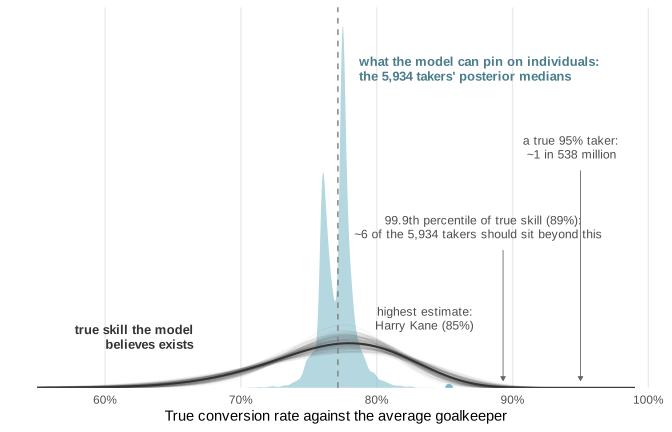
Can we also say how likely it is that we have seen a taker with a true conversion rate of 95%? Such a conversion rate would be 5.9 standard deviations above the average taker: under the fitted normal skill distribution, roughly one in every 538 million takers is at that level4 – though the posterior uncertainty this far out in the tail is enormous: the 95% credible interval runs from one in 1,400,000 to one in \(10^{14}\). A true 98% taker would be 9.1 standard deviations out, or about one in \(10^{19}\) takers (95% CrI: \(10^{13}\) to \(10^{33}\)). Whether football has nonetheless already produced such takers, I leave as an exercise to the reader (the table above is sortable by observed conversion rate, if that helps).
So why can’t we say who these players are? A taker’s true skill posterior is, approximately, a precision-weighted average of the population average and their own record. On the logit scale, one kick at conversion rate \(p\) carries about \(p(1-p)\) units of Fisher information5, while the population prior is worth \(1/\sigma_{\text{taker}}^2\) units. The two have equal influence on the skill estimate when
\[ n^{*} \;=\; \frac{1/\sigma_{\text{taker}}^2}{p(1-p)}, \]
which with our estimates comes out at \(n^{*} \approx\) 66 kicks: a taker needs about that many penalties before their own record matches the weight of the prior – and at exactly \(n^{*}\) the estimate still sits halfway between their record and the average. Only 9 of the 5,934 takers in the data clear that bar (pun intended) at all. Even the biggest career, Cristiano Ronaldo’s 149 kicks, still leaves the prior holding 31% of the weight: at a ≈77% baseline each kick just carries remarkably little signal unfortunately.
All of this means that the maximum of the per-player posterior means systematically understates the maximum of true skills, because every one of those means has been shrunk toward the average. On the other hand, the maximum of the raw records – Ivan Toney’s 29 out of 30 here, or Le Tissier’s often quoted 47/48 record – overstates it, as with a noisy measure, the top position belongs to someone who, besides being good, was also lucky.
gk_tail_draws <- spread_draws(m, b_Intercept, sd_gk_name__Intercept) |>
mutate(
p999_gk_prob = plogis(b_Intercept - qnorm(0.999) * sd_gk_name__Intercept),
p999_gk_saved = plogis(b_Intercept) - p999_gk_prob
)
sd_gk <- median(gk_tail_draws$sd_gk_name__Intercept)
p999_gk <- median(gk_tail_draws$p999_gk_prob)
p999_gk_saved <- median(gk_tail_draws$p999_gk_saved)
n_equal_gk <- 1 / (sd_gk^2 * info_per_kick)
most_faced <- gk_ranks |> slice_max(n_total, n = 1, with_ties = FALSE)
most_faced_nm <- str_replace_all(most_faced$gk_name, "\\.", " ")Does the same hold for the identification of goalkeeper skil? Their skill spread is actually a bit narrower – \(\sigma_{\text{gk}} =\) 0.23 logits – but a keeper’s effect pushes the probability down the logistic curve, where it is steeper, so a 99.9th-percentile keeper still holds the takers they face to a conversion rate of ≈62%. That is 14.9 pp prevented – more than the best takers add. Identifying who they exactly are is just as hard, though: the narrower spread raises the break-even career to \(n^{*} \approx\) 105 kicks faced, which only 3 keepers clear (Hugo Lloris leads at 119).
As mentioned before, there’s information in the team’s decision. We can model these as a latent belief about a teammate’s penalty-taking skill. Most penalties are taken by the supposedly better takers, so there is a strong selection effect: we only ever observe a scoring outcome for the player who was chosen to take the kick. If that choice indeed tracks skill, the takers we observe are a non-random, better-than-average slice of all footballers. When we fit a model on this data we should be careful not to conflate “the average taker” for “the average player”.
In attempt to correct for this selection effect, we fit a joint (Heckman-style) model with two linked equations. For each of the players on the pitch at penalty \(i\) (indexed \(\text{pl}[i]\), facing keeper \(\text{gk}[i]\)):
\[ \begin{aligned} \textbf{Selection:}\quad \text{Taker}_i &\sim \operatorname{Bernoulli}(\pi_i), \\ \operatorname{logit}(\pi_i) &= \gamma_{\text{slot}[i]} + \delta\,\mathbb{1}[\text{GK}_i] + a_{\text{pl}[i]} \\[4pt] \textbf{Outcome:}\quad \text{Goal}_i \mid \text{Taker}_i{=}1 &\sim \operatorname{Bernoulli}(p_i), \\ \operatorname{logit}(p_i) &= \beta_0 + u_{\text{pl}[i]} + v_{\text{gk}[i]} \\[4pt] \textbf{Player effects:}\quad \begin{pmatrix} a_j \\ u_j \end{pmatrix} &\sim \operatorname{Normal}(\mathbf 0,\ \Sigma), \qquad \Sigma = \begin{pmatrix} \sigma_a^2 & \rho\,\sigma_a\sigma_u \\ \rho\,\sigma_a\sigma_u & \sigma_u^2 \end{pmatrix}, \\[4pt] \textbf{Keeper effect:}\quad v_k &\sim \operatorname{Normal}(0,\sigma_v^2). \end{aligned} \]
The selection equation asks, among the eleven players on the pitch (the risk set), who actually steps up: \(\gamma_{\text{slot}}\) gives a separate base rate for open-play penalties and for shootouts (where several players take a kick), \(\delta\) lets goalkeepers almost never be the taker6, and \(a_j\) is player \(j\)’s latent propensity to be chosen. The outcome equation is observed only for the taker (subset(is_taker) in brms): \(\beta_0\) is the global log-odds of scoring, \(u_j\) is taker \(j\)’s scoring skill and \(v_k\) is keeper \(k\)’s suppression of it.
The two per-player effects couple the equations by drawing \(a_j\) and \(u_j\) from a shared bivariate normal with correlation \(\rho\). \(\rho\) measures whether the players teams choose are also the players who score: a positive \(\rho\) says selection tracks skill. It also allows us to estimate the skill for players we never see take a penalty; their scoring skill \(u_j\) is inferred from their selection propensity \(a_j\) through \(\rho\). \(\beta_0\) now corresponds to the average footballer rather than the average penalty taker.
Ideally, we would fit a more complex model that also takes into account who the other players on the field were: if both Kane and Tony are on the field and Kane takes it, we get some information on who is the better penalty taker between them. Similarly, in shootouts there is information on who is selected among the first 5 takers. I think such a model would amount to a discrete choice model. However, it would require me to write custom Stan code so for now I revert to the simpler selection model that I can fit in brms.
lineups_penalties <- get_penalty_lineups()
model_df_raw <- lineups_penalties |>
# join the penalty event context to all 11 players on the field during penalty.
# inner_join so lineup rows with no matching penalty event -- i.e. the female-league
# events filtered out of df_male -- are dropped explicitly here rather than
# surviving as NA rows that get implicitly swept out by the slot filters below.
# relationship = "many-to-one": many lineup players map to a single penalty
# event (df_male is unique on match_id x event_id)
inner_join(
df_male |>
select(
match_id,
event_id,
gk_id,
competition,
competition_type_detailed,
is_goal_actual = is_goal,
is_shootout,
shootout_team_kick_seq_nr,
shootout_seq_total
),
by = c("match_id", "event_id"),
relationship = "many-to-one"
)
# Collapse shootouts so each contributes one row per starter (instead of
# n_kicks * 11). For takers we keep the row of their first kick; non-takers'
# kick-level fields (is_goal_actual, gk_id, event_id) come from an arbitrary
# kick row but go unused; the outcome equation subsets on is_taker.
shootout_rows <- model_df_raw |>
filter(is_shootout) |>
group_by(match_id, player_id, player_name) |>
arrange(desc(is_taker), shootout_team_kick_seq_nr, .by_group = TRUE) |>
slice(1) |>
ungroup()
model_df_all_comps <- bind_rows(
model_df_raw |> filter(!is_shootout),
shootout_rows
) |>
# 4. Build the 'slot' variable and the masked 'is_goal'
mutate(
# With shootouts collapsed to (shootout x player), slot is now a 2-level
# opportunity type: in_game vs shootout.
slot = case_when(
!is_shootout ~ "in_game",
is_shootout ~ "shootout",
TRUE ~ "unknown"
),
is_gk = position == 'GK',
# Convert slot to a factor for brms
slot = factor(slot, levels = c("in_game", "shootout")),
# The outcome is ONLY observed for the taker. Everyone else gets NA.
# We must ensure is_goal is integer 1/0 for the Bernoulli family in brms.
is_goal = if_else(is_taker, as.integer(is_goal_actual), NA_integer_),
is_taker = as.integer(is_taker)
) |>
# Drop events where we couldn't determine the slot properly
filter(slot != "unknown")
# English top-flight competitions: the only ones in this dataset with decent cup
# (hence shootout) coverage, which is what supplies players who actually take
# penalties and so identifies the outcome equation. Reused in the prose below.
england_competitions <- c("ENG-Premier League", "ENG-FA Cup", "ENG-League Cup")
model_df_england <- model_df_all_comps |>
filter(competition %in% england_competitions)
# Share of players on the pitch who never take a penalty in a given opportunity
# set. Never-takers carry no outcome information, so a set dominated by them is
# poor for identification.
share_never_taker <- function(df) {
df |>
group_by(player_id) |>
summarise(ever_taker = any(is_taker == 1), .groups = "drop") |>
summarise(p = mean(!ever_taker)) |>
pull(p)
}
pct_never_england <- share_never_taker(model_df_england)
pct_never_top5_cup <- share_never_taker(
model_df_all_comps |>
filter(competition_type_detailed %in% c("top 5 league", "cup"))
)Moreover, we limit ourselves to the English top level competitions from our dataset because the cup coverage in this dataset from the other leagues is limited: I think this is important for model identification: 60.9% has never taken a penalty in the English top level competitions (Premier League, FA Cup and League Cup), while this is as high as 72.3% if we filter down to top 5 leagues and cups (because cup games where shootouts can happen are mostly not covered).
library(brms)
# Equation 1: Selection (Who takes it from players on field?)
eq_selection <- bf(
is_taker ~ 0 + slot + is_gk + (1 | rho | player_id),
family = bernoulli()
)
# Equation 2: Outcome (Do they score?)
eq_outcome <- bf(
is_goal | subset(is_taker) ~ 1 + (1 | rho | player_id) + (1 | gk_id),
family = bernoulli()
)
# Combine, define priors, and fit
# Note: set_rescor(FALSE) is required for categorical/bernoulli multivariate models
joint_formula <- eq_selection + eq_outcome + set_rescor(FALSE)
priors <- c(
# 1. Fixed Effects (Coefficients for 'slot')
# Using a regularizing Normal or Student-t instead of the 2008 Cauchy
prior(normal(0, 5), class = "b", resp = "istaker"),
# 2. Intercept for the Outcome Equation
# Slightly wider, akin to the 2008 recommendation for intercepts
prior(normal(0, 5), class = "Intercept", resp = "isgoal"),
# 3. Variance Components (Random Effects)
# Using the modern Exponential instead of the 2006 half-Cauchy
prior(exponential(1), class = "sd", resp = "istaker"),
prior(exponential(1), class = "sd", resp = "isgoal"),
# 4. Correlation Matrix
prior(lkj(2), class = "cor")
)
penalty_selection_model <- brm(
formula = joint_formula,
data = model_df_england,
prior = priors,
file = "models/brms_penalty_selection_correlation_england",
seed = 2026,
chains = 4,
cores = 4,
refresh = 5,
iter = 2000,
backend = "cmdstanr"
)library(tidybayes)
draws_taker <- spread_draws(
penalty_selection_model,
b_isgoal_Intercept,
r_player_id__isgoal[player_id, term]
) |>
filter(term == "Intercept") |>
mutate(
base_prob = plogis(b_isgoal_Intercept),
taker_prob = plogis(b_isgoal_Intercept + r_player_id__isgoal),
added_prob = taker_prob - base_prob
)
taker_ranks <- draws_taker |>
group_by(player_id) |>
summarise(
median_abs = median(taker_prob),
mean_abs = mean(taker_prob),
q025_abs = quantile(taker_prob, probs = 0.025, names = FALSE),
q975_abs = quantile(taker_prob, probs = 0.975, names = FALSE),
median_added = median(added_prob),
mean_added = mean(added_prob),
q025_added = quantile(added_prob, probs = 0.025, names = FALSE),
q975_added = quantile(added_prob, probs = 0.975, names = FALSE),
.groups = "drop"
) |>
arrange(desc(median_added)) |>
mutate(rank = row_number())
player_summary <- model_df_england |>
group_by(player_id) |>
summarise(
n_opportunities = n(),
n_taken = sum(is_taker),
n_scored = sum(is_goal, na.rm = TRUE),
.groups = "drop"
)
summary_ext <- taker_ranks |>
left_join(
model_df_england |> distinct(player_id, player_name),
by = "player_id"
) |>
left_join(player_summary, by = "player_id")
rho_post <- brms::posterior_summary(
penalty_selection_model,
variable = "cor_player_id__istaker_Intercept__isgoal_Intercept"
)
# baseline = average-footballer conversion (the outcome intercept on prob scale).
baseline_conv <- median(draws_taker$base_prob)
top_taker_name <- summary_ext |>
arrange(desc(median_abs)) |>
slice(1) |>
pull(player_name) |>
str_replace_all("\\.", " ")
worst_taker <- summary_ext |>
filter(!is.na(median_abs)) |>
arrange(median_abs) |>
slice(1)
toney <- summary_ext |> filter(str_detect(player_name, "Toney")) |> slice(1)taker_ranks_sel <- summary_ext |>
filter(!is.na(player_name)) |>
transmute(
player_name,
n_total = n_taken,
n_success = n_scored,
median_abs,
median_added,
q025_added,
q975_added
) |>
arrange(desc(median_abs)) |>
mutate(rank = row_number())
# draws_taker is keyed on player_id; attach the name so the sparklines join.
draws_taker_named <- draws_taker |>
left_join(
summary_ext |> distinct(player_id, player_name),
by = "player_id"
)
table_re(
taker_ranks_sel,
draws_taker_named,
"player_name",
effect_label = "Added scoring probability vs. average",
rate_label = "Scored %",
count_label = "Scored",
baseline_prob = baseline_conv,
# default to the top 5: these estimates lean on the selection model's
# extrapolation, so show fewer by default than the firmer tables above.
page_size = 5
)In this filtered dataset we see that Harry Kane is still the top penalty taker. However, the bottom part is much more interesting now, as the worst penalty takers are now believed to be those players who had many opportunities but were not selected by themselves or their team in shootouts or during on field penalties. And instead of getting the average conversion rate among penalty takers, we now estimate the average conversion rate among footballers. This is slightly lower, at about 71%, with the worst players expected to convert only around 63%. Already good takers who were also trusted a lot, like Ivan Toney (took 16 of 17 opportunities in this dataset), are estimated to be even a bit better now.
The exact skill estimate for the bottom takers are probably up for debate: a player who never takes a penalty has no scoring record, so the model can only infer their conversion from how unlikely they are to be picked, (this is then translated into an actual skill estimate through the correlation \(\rho\)). And with no data to anchor the skill estimates for the never takers, it is the prior rather than the evidence that decides the exact number. The numbers for the worst takers are therefore best read as an educated extrapolation.
What’s less up for debate I think, is the correlation parameter between a player’s likelihood of taking a penalty and their ability to score one. This comes out at 0.71 (95% CrI 0.46 to 0.93). The players who are most likely to step up (the regular penalty takers) seem indeed the best at converting them. In other words, the teams are pretty good at selecting their penalty takers!
Every penalty goes to one of three zones: the taker’s dominant side, their non-dominant side, or the centre. Because these probabilities must sum to 100%, any player’s tendency can be visualized as a single point on a three-way simplex.
To estimate these tendencies, we can use a Dirichlet-multinomial model, which naturally handles this three-way split by breaking the problem into two layers:
\[ \begin{aligned} \mathbf{p}_i &\sim \operatorname{Dirichlet}(\phi\,\boldsymbol{\mu}) \\ \mathbf{y}_i &\sim \operatorname{Multinomial}(n_i,\ \mathbf{p}_i) \end{aligned} \]
For taker \(i\), \(\mathbf{y}_i = (y_{i,\text{dom}}, y_{i,\text{non}}, y_{i,\text{cen}})\) are their zone counts over \(n_i\) penalties and \(\boldsymbol{\mu}\) is the global mean pattern (the split: the three \(\mu_z\) sum to 1). The concentration \(\phi\) functions like a prior sample size: it is the number of ‘pseudo-kicks’ worth of evidence the global pattern \(\boldsymbol{\mu}\) carries, so a player’s own record only starts to dominate once they have taken more than \(\phi\) penalties.
df_player_preference <- df_male |>
select(1:5, taker_name, kick_foot, shot_zone, shot_zone_dominance) |>
count(taker_name, shot_zone_dominance) %>%
pivot_wider(
names_from = shot_zone_dominance,
values_from = n,
values_fill = list(n = 0) # Fill NAs with 0 for players who haven't shot in a zone
) %>%
mutate(total_penalty_kicks = Dominant + Non_dominant + Centre)
fit <- brms::brm(
formula = cbind(Dominant, Non_dominant, Centre) |
brms::trials(total_penalty_kicks) ~ 1,
family = brms::dirichlet_multinomial(),
data = df_player_preference,
backend = 'cmdstanr',
chains = 4,
cores = 4,
seed = 2026,
file = "models/brms_zone_preference"
)
summary(fit) Family: dirichlet_multinomial
Links: muNondominant = logit; muCentre = logit
Formula: cbind(Dominant, Non_dominant, Centre) | trials(total_penalty_kicks) ~ 1
Data: df_player_preference (Number of observations: 5939)
Draws: 4 chains, each with iter = 2000; warmup = 1000; thin = 1;
total post-warmup draws = 4000
Regression Coefficients:
Estimate Est.Error l-95% CI u-95% CI Rhat Bulk_ESS
muNondominant_Intercept -0.27 0.01 -0.30 -0.24 1.00 3363
muCentre_Intercept -1.49 0.02 -1.54 -1.45 1.00 2606
Tail_ESS
muNondominant_Intercept 2978
muCentre_Intercept 2819
Further Distributional Parameters:
Estimate Est.Error l-95% CI u-95% CI Rhat Bulk_ESS Tail_ESS
phi 30.25 2.84 25.40 36.54 1.00 3507 2698
Draws were sampled using sample(hmc). For each parameter, Bulk_ESS
and Tail_ESS are effective sample size measures, and Rhat is the potential
scale reduction factor on split chains (at convergence, Rhat = 1).# the Dirichlet concentration acts like a prior sample size: the global pattern is
# worth roughly this many kicks, so a player's own history only outweighs it
# once they have taken more than that
phi_zone <- unname(brms::posterior_summary(fit, variable = "phi")[, "Estimate"])To see exactly why \(\phi\) represents this tipping point, we can look at the posterior estimate for a player’s tendency, which forms a weighted average: \(\hat{\mathbf{p}}_i = \left(\frac{\phi}{\phi + n_i}\right) \boldsymbol{\mu} + \left(\frac{n_i}{\phi + n_i}\right) \frac{\mathbf{y}_i}{n_i}\). The global baseline is weighted by \(\frac{\phi}{\phi + n_i}\) and the player’s empirical data is weighted by \(\frac{n_i}{\phi + n_i}\). A player’s individual history becomes more informative than the global dataset exactly when their personal weight strictly exceeds the global weight (\(\frac{n_i}{\phi + n_i} > \frac{\phi}{\phi + n_i}\)). Because the denominators are identical, they cancel out and give us the threshold: \(n_i > \phi\).
Because penalty placement preferences are so alike across players, a player’s first few kicks don’t tell us much about their own tendencies. The fitted concentration says the global average carries the weight of about 30 kicks: it isn’t until a player has taken more than 30 penalties that their own history predicts their next shot better than simply going with the global placement pattern.
A few things are worth noting on this calculation. For example, you could make the argument that this high \(\phi\) value is to be expected because this data consists only of penalty takers and mostly of takers who have taken lots of penalties (i.e. specialists) and these know they need to be maximally unpredictable to maximize their chances in the long run and therefore vary a lot. Among inexperienced players, this may be less the case and \(\phi\) may be lower. A counterpoint to this is that in the previous blog post we observed that there is not that great of a difference in distribution across left, centre, right between different match situations, experience, and player position.7 So maybe we indeed do need that many penalties. This would suggest the study of the opponent is in part an overfitting exercise.8
We can use these estimated \(\phi\) and \(\boldsymbol{\mu}\) to set up an interactive calculator that quantitatively updates our beliefs on where a player is going to shoot.9
# pass the conjugate parameters (global pattern mu and concentration phi) to OJS
mu_zone <- brms::posterior_epred(
fit, newdata = data.frame(total_penalty_kicks = 1)
)[, 1, ] |> colMeans()
ojs_define(
phi_cal = phi_zone,
mu_dom = unname(mu_zone["Dominant"]),
mu_non = unname(mu_zone["Non_dominant"]),
mu_cen = unname(mu_zone["Centre"])
)
# also pass thinned posterior draws so the calculator can propagate the
# uncertainty in phi and mu (Dominant is the softmax reference category)
draws <- as.data.frame(fit,
variable = c("b_muNondominant_Intercept", "b_muCentre_Intercept", "phi"))
draws <- draws[round(seq(1, nrow(draws), length.out = 400)), ]
e_non <- exp(draws$b_muNondominant_Intercept)
e_cen <- exp(draws$b_muCentre_Intercept)
den <- 1 + e_non + e_cen
ojs_define(
phi_draws = draws$phi,
mu_dom_draws = 1 / den,
mu_non_draws = e_non / den,
mu_cen_draws = e_cen / den
)Where would this taker’s next penalty go?
penaltyCalc = {
const num = (x) => +(Array.isArray(x) ? x[0] : x);
const phi = num(phi_cal);
const keys = ["Dominant", "Non-dominant", "Centre"];
const idx = {Dominant: 0, "Non-dominant": 1, Centre: 2};
const muG = {Dominant: num(mu_dom), "Non-dominant": num(mu_non), Centre: num(mu_cen)};
// Conjugate Dirichlet-multinomial update for a kick vector, with the posterior
// uncertainty in (phi, mu) propagated as a mixture of conjugate Dirichlets:
// closed-form posterior mean (Mbar) and covariance (Sigma) by total covariance.
const computeCalc = (kicks) => {
const y = {Dominant: kicks.dom, "Non-dominant": kicks.non, Centre: kicks.cen};
const n = kicks.dom + kicks.non + kicks.cen;
const w = n / (n + phi);
const emp = {};
for (const z of keys) emp[z] = n > 0 ? y[z] / n : muG[z];
const S = phi_draws.length;
const Mbar = [0, 0, 0];
const ms = new Array(S);
const Cw = [[0, 0, 0], [0, 0, 0], [0, 0, 0]];
for (let s = 0; s < S; s++) {
const a = [
phi_draws[s] * mu_dom_draws[s] + y.Dominant,
phi_draws[s] * mu_non_draws[s] + y["Non-dominant"],
phi_draws[s] * mu_cen_draws[s] + y.Centre
];
const a0 = a[0] + a[1] + a[2];
const m = [a[0] / a0, a[1] / a0, a[2] / a0];
ms[s] = m;
const f = 1 / (a0 + 1);
for (let i = 0; i < 3; i++) {
Mbar[i] += m[i] / S;
for (let j = 0; j < 3; j++)
Cw[i][j] += ((i === j ? m[i] * (1 - m[i]) : -m[i] * m[j]) * f) / S;
}
}
const Sigma = [[0, 0, 0], [0, 0, 0], [0, 0, 0]];
for (let i = 0; i < 3; i++)
for (let j = 0; j < 3; j++) {
let bt = 0;
for (let s = 0; s < S; s++) bt += (ms[s][i] - Mbar[i]) * (ms[s][j] - Mbar[j]);
Sigma[i][j] = Cw[i][j] + bt / S;
}
const postMean = {Dominant: Mbar[0], "Non-dominant": Mbar[1], Centre: Mbar[2]};
const ci = {};
for (const z of keys) {
const sd = Math.sqrt(Sigma[idx[z]][idx[z]]);
ci[z] = [Math.max(0, postMean[z] - 1.96 * sd), Math.min(1, postMean[z] + 1.96 * sd)];
}
return {keys, n, w, mu: muG, emp, Sigma, postMean, ci};
};
// Ternary plot: posterior mean (filled dot), 95% credible ellipse, global
// split (hollow dot) and the raw record joined by a shrinkage segment.
const drawTernary = (calc) => {
const {mu, postMean, Sigma} = calc;
const W = 380, H = 345, padX = 52, padTop = 30, padBot = 38;
const corners = {
Dominant: [0, 0],
"Non-dominant": [1, 0],
Centre: [0.5, Math.sqrt(3) / 2]
};
const sx = d3.scaleLinear([0, 1], [padX, W - padX]);
const sy = d3.scaleLinear([0, Math.sqrt(3) / 2], [H - padBot, padTop]);
const bary = (p, i) =>
p.Dominant * corners.Dominant[i] +
p["Non-dominant"] * corners["Non-dominant"][i] +
p.Centre * corners.Centre[i];
const px = (p) => [sx(bary(p, 0)), sy(bary(p, 1))];
const svg = d3.create("svg")
.attr("viewBox", [0, 0, W, H])
.attr("width", W).attr("height", H)
.attr("font-family", "Atkinson Hyperlegible, sans-serif")
.attr("style", "max-width:100%;height:auto;overflow:visible");
// faint interior gridlines at 25 / 50 / 75 %
for (const t of [0.25, 0.5, 0.75]) {
const segs = [
[{Dominant: t, "Non-dominant": 1 - t, Centre: 0}, {Dominant: t, "Non-dominant": 0, Centre: 1 - t}],
[{Dominant: 1 - t, "Non-dominant": t, Centre: 0}, {Dominant: 0, "Non-dominant": t, Centre: 1 - t}],
[{Dominant: 1 - t, "Non-dominant": 0, Centre: t}, {Dominant: 0, "Non-dominant": 1 - t, Centre: t}]
];
for (const [a, b] of segs) {
const A = px(a), B = px(b);
svg.append("line")
.attr("x1", A[0]).attr("y1", A[1]).attr("x2", B[0]).attr("y2", B[1])
.attr("stroke", "#e7e1d4").attr("stroke-width", 1);
}
}
// triangle frame
const tri = [corners.Dominant, corners["Non-dominant"], corners.Centre]
.map(c => [sx(c[0]), sy(c[1])].join(","));
svg.append("polygon")
.attr("points", tri.join(" "))
.attr("fill", "none").attr("stroke", "#1D323E").attr("stroke-width", 1.5);
// vertex labels -- middle-anchored and inside the viewBox so they never clip
for (const [txt, c, dy] of [
["Dominant", corners.Dominant, 20],
["Non-dominant", corners["Non-dominant"], 20],
["Centre", corners.Centre, -11]
]) {
svg.append("text")
.attr("x", sx(c[0])).attr("y", sy(c[1]) + dy)
.attr("text-anchor", "middle").attr("font-size", 12.5)
.attr("font-weight", 700).attr("fill", "#1D323E")
.text(txt);
}
// 95% credible region: project the propagated 3-simplex covariance to pixels
// (A * Sigma * A^T) and draw the ellipse
{
const cpx = [px({Dominant: 1, "Non-dominant": 0, Centre: 0}),
px({Dominant: 0, "Non-dominant": 1, Centre: 0}),
px({Dominant: 0, "Non-dominant": 0, Centre: 1})];
const Ar = [[cpx[0][0], cpx[1][0], cpx[2][0]], [cpx[0][1], cpx[1][1], cpx[2][1]]];
const quad = (r, c) => {
let v = 0;
for (let a = 0; a < 3; a++) for (let b = 0; b < 3; b++) v += Ar[r][a] * Sigma[a][b] * Ar[c][b];
return v;
};
const cxx = quad(0, 0), cxy = quad(0, 1), cyy = quad(1, 1);
const dsc = Math.sqrt(Math.max(0, (cxx - cyy) ** 2 / 4 + cxy * cxy));
const l1 = (cxx + cyy) / 2 + dsc, l2 = Math.max(0, (cxx + cyy) / 2 - dsc);
const ang = Math.abs(cxy) > 1e-9 ? Math.atan2(l1 - cxx, cxy) : (cxx >= cyy ? 0 : Math.PI / 2);
const Mp = px(postMean), kk = 5.991; // chi-square 0.95, 2 dof
svg.append("ellipse")
.attr("cx", Mp[0]).attr("cy", Mp[1])
.attr("rx", Math.sqrt(l1 * kk)).attr("ry", Math.sqrt(l2 * kk))
.attr("transform", `rotate(${ang * 180 / Math.PI}, ${Mp[0]}, ${Mp[1]})`)
.attr("fill", "rgba(120, 183, 197, 0.18)").attr("stroke", "#78B7C5")
.attr("stroke-width", 1).attr("stroke-opacity", 0.55);
}
// shrinkage segment: global -> raw record
if (calc.n > 0) {
const A = px(mu), B = px(calc.emp);
svg.append("line")
.attr("x1", A[0]).attr("y1", A[1]).attr("x2", B[0]).attr("y2", B[1])
.attr("stroke", "#9aa7ab").attr("stroke-width", 1).attr("stroke-dasharray", "3,3");
svg.append("circle").attr("cx", B[0]).attr("cy", B[1]).attr("r", 4)
.attr("fill", "#9aa7ab").attr("opacity", 0.85);
}
// global split (hollow)
const G = px(mu);
svg.append("circle").attr("cx", G[0]).attr("cy", G[1]).attr("r", 5)
.attr("fill", "#faf8f3").attr("stroke", "#1D323E").attr("stroke-width", 1.5);
// shrunken estimate (headline)
const P = px(postMean);
svg.append("circle").attr("cx", P[0]).attr("cy", P[1]).attr("r", 7)
.attr("fill", "#78B7C5").attr("stroke", "#1D323E").attr("stroke-width", 1.2);
return svg.node();
};
// Readout table: global split, the taker's raw record, and the shrunken
// estimate with its 95% credible interval.
const drawReadout = (calc) => {
const fmt = d3.format(".0%");
const k = calc.keys;
const mu = calc.mu;
const cell = (obj, z) => obj === null ? "—" : fmt(obj[z]);
const row = (name, obj, cls = "") =>
html`<tr class="${cls}"><td>${name}</td>${k.map(z => html`<td>${cell(obj, z)}</td>`)}</tr>`;
const postCell = (z) => html`<td>${fmt(calc.postMean[z])}<span class="ci">${fmt(calc.ci[z][0])}–${fmt(calc.ci[z][1])}</span></td>`;
return html`<div class="calc-readout">
<p>With <b>${calc.n}</b> kick${calc.n === 1 ? "" : "s"} on record, the estimate puts
<b>${fmt(calc.w)}</b> of the weight on this taker's own history and
<b>${fmt(1 - calc.w)}</b> on the global split.</p>
<table>
<thead><tr><th></th>${k.map(z => html`<th>${z}</th>`)}</tr></thead>
<tbody>
${row("Global split", mu)}
${row("This taker's record", calc.n > 0 ? calc.emp : null)}
<tr class="post-row"><td>Shrunken estimate <span class="ci">95% CrI</span></td>${k.map(z => postCell(z))}</tr>
</tbody>
</table>
<p class="calc-note">Dot = posterior mean; the shaded ellipse and the intervals give the 95% credible region, propagating the uncertainty in φ, μ and the taker's own record.</p>
</div>`;
};
// sliders: full-width ranges with a live value beside each label
const mk = (label, value) => {
const range = html`<input type="range" min="0" max="100" step="1" value="${value}">`;
const val = html`<span class="kick-val">${value}</span>`;
const row = html`<div class="kick-row"><label>${label} ${val}</label>${range}</div>`;
return {range, val, row};
};
const d = mk("Dominant", 3), nd = mk("Non-dominant", 3), ce = mk("Centre", 3);
const form = html`<form class="kick-sliders">${d.row}${nd.row}${ce.row}</form>`;
// recompute + redraw the plot and table in place whenever a slider moves
const plotCell = html`<div class="calc-plot"></div>`;
const outCell = html`<div class="calc-out"></div>`;
const update = () => {
const calc = computeCalc({dom: +d.range.value, non: +nd.range.value, cen: +ce.range.value});
plotCell.replaceChildren(drawTernary(calc));
outCell.replaceChildren(drawReadout(calc));
};
for (const s of [d, nd, ce])
s.range.oninput = () => { s.val.textContent = s.range.value; update(); };
update();
return html`<div class="calc-grid">
<div class="calc-inputs">${form}</div>
${plotCell}
${outCell}
</div>`;
}We can take our Dirichlet model a step further and let each taker have their own placement preference instead of sharing the single global one, by adding a per-taker random intercept:
\[ \begin{aligned} \mathbf{y}_i &\sim \operatorname{Dirichlet\text{-}multinomial}(n_i,\ \phi\,\boldsymbol{\mu}_i) \\ \mu_{i,z} &\propto \exp(\beta_z + u_{i,z}), \qquad u_{i,z} \sim \operatorname{Normal}(0, \sigma_z^2) \end{aligned} \]
Now each taker \(i\) has their own pattern \(\boldsymbol{\mu}_i\), the \(u_{i,z}\) pulling it away from the global \(\boldsymbol{\mu}\) (Dominant is the reference, so \(\beta_{\text{dom}} = u_{i,\text{dom}} = 0\)). The per-zone \(\sigma_z\) say how much takers vary in each zone.
fit_re <- brms::brm(
formula = cbind(Dominant, Non_dominant, Centre) |
brms::trials(total_penalty_kicks) ~ 1 + (1 | taker_name),
family = brms::dirichlet_multinomial(),
data = df_player_preference,
backend = 'cmdstanr',
chains = 4,
cores = 4,
seed = 2026,
file = "models/brms_zone_preference_re"
)We see that each player gets their own latent preference simplex shrunk toward the global one, and the estimated random-intercept SDs come out very uneven across zones – much larger for the centre than for the non-dominant side – so players differ from one another mainly in how willing they are to go down the middle, not in how often they use their weak side.
The model also comes with an asterisk as every player only contributes a single aggregated row of counts, so a per-player random intercept and the Dirichlet concentration \(\phi\) end up explaining the same between-player spread and are only weakly separable (hence the borderline Rhat and ESS). I hope it can still be suggestive, though.
Let’s look at the most idiosyncratic takers (and, given enough kicks, the most predictable ones):
# brms::ranef() gives a [taker, summary-stat, coefficient] array; the
# coefficients are the per-category intercept deviations (Dominant is the
# reference category). We rank takers by how far that deviation vector sits
# from 0 -- i.e. from the global average preference -- on the latent scale.
re_est <- brms::ranef(fit_re)$taker_name[, "Estimate", ]
# brms stores RE levels with spaces swapped for dots while df_player_preference
# keeps the originals, so match on a key normalised to single spaces
norm_key <- function(x) {
stringr::str_squish(stringr::str_replace_all(x, "[. ]+", " "))
}
idiosyncrasy <- tibble::tibble(
taker_key = norm_key(rownames(re_est)),
idiosyncrasy = sqrt(rowSums(re_est^2))
)
# global zone split, pooled over every penalty -- the reference shown in
# brackets and used to shade each cell by how far the player sits from it
global_split <- with(df_player_preference, c(
Dominant = sum(Dominant),
Non_dominant = sum(Non_dominant),
Centre = sum(Centre)
))
global_split <- global_split / sum(global_split)
idiosyncratic_takers <- df_player_preference |>
dplyr::mutate(taker_key = norm_key(taker_name)) |>
dplyr::left_join(idiosyncrasy, by = "taker_key") |>
dplyr::transmute(
Player = taker_name,
Kicks = total_penalty_kicks,
Dominant = Dominant / total_penalty_kicks,
Non_dominant = Non_dominant / total_penalty_kicks,
Centre = Centre / total_penalty_kicks,
Idiosyncrasy = idiosyncrasy
)
# each cell shows the player's share with the global share in brackets and an
# accent fill proportional to |player - global|; a fixed 25pp reference keeps the
# shading comparable now that every taker is listed (incl. one-kick players whose
# raw split would otherwise blow out a data-driven scale)
dev_cap <- 0.25
zone_col <- function(global, label) {
reactable::colDef(
name = label,
align = "right",
minWidth = 110,
cell = function(value) {
sprintf("%.0f%% (%.0f%%)", 100 * value, 100 * global)
},
style = function(value) {
list(background = scales::alpha(
"#78B7C5", min(1, abs(value - global) / dev_cap)
))
}
)
}
reactable::reactable(
idiosyncratic_takers,
defaultSorted = list(Idiosyncrasy = "desc"),
defaultPageSize = 10,
showPageSizeOptions = TRUE,
pageSizeOptions = c(10, 25, 50, 100),
compact = TRUE,
highlight = TRUE,
searchable = TRUE,
columns = list(
Player = reactable::colDef(minWidth = 160),
Kicks = reactable::colDef(width = 80, align = "right"),
Dominant = zone_col(global_split[["Dominant"]], "Dominant"),
Non_dominant = zone_col(global_split[["Non_dominant"]], "Non-dominant"),
Centre = zone_col(global_split[["Centre"]], "Centre"),
Idiosyncrasy = reactable::colDef(
format = reactable::colFormat(digits = 2),
align = "right",
minWidth = 120
)
),
theme = reactable::reactableTheme(
highlightColor = "#eef6f8",
headerStyle = list(
borderBottom = "2px solid #78B7C5",
whiteSpace = "nowrap"
)
)
)After writing these blog posts, I realized that – by modeling the skills as posterior distributions – our taker and goalkeeper skill estimates enable at least two more useful things. First, we may want to compare two players and quantify the chance that one is the better taker or goalkeeper than the other. We can do this by simply comparing each of the draws of the posterior distribution between the players. The proportion of draws where the skill estimate of player A is higher than player B corresponds to our quantified belief that player A is the better penalty taker or goalkeeper than player B. Or more accurately, that player A has been better than player B as we model performance to date, not necessarily future skill.
Second, this same posterior distribution lets us simulate entire shootouts between two sets of players: draw from each player’s posterior and use the results in a Monte Carlo simulation. Besides being fun, it can provide an answer to what matters more in a shootout: good takers or good goalkeepers. Would you rather have one Tim Melia or 10 Harry Kanes (like) players during your shootout?10
I have published a website at penaltystats.maxoosterwegel.com with tools that allow you to do these two things (compare skill estimates, simulate shootouts) and browse skill estimates from the same model described above but fitted on a dataset with broader temporal and geographical coverage amounting to a total of 300k+ penalty kicks! Check it out!
I realize that because this is so obvious it may read like I have never watched or played football and am trying to learn about the game through numbers only like an American hedge fund that has just bought a football club. Unfortunately, I have spent more time watching (dire) football than I like to admit. I’ve also played quite a bit of football. I pose the question because it corresponds to a fun model and creates a beautiful visualization.↩︎
They have data from training though and I believe there are other qualities that are informative on penalty skill, e.g. ball striking. It’s probably not a coincidence that Harry Kane is on top as he is a historically great ball striker. On the other hand, other historical good finishers, like Griezman, Messi, Luis Suárez, and Son Heung-Min are only average or even worse than average penalty takers.↩︎
Luck would have it that the very few penalties from Bart Verbruggen’s professional career that are not in the dataset (Conference League, not covered by my data source), he saved: on February 23, 2023 he saved 3 penalties in a shootout for Anderlecht. I may try to obtain a more complete dataset in the lead up to the knockout phase of the tournament. Update: see penaltykicks.maxoosterwegel.com for a much more comprehensive dataset with all data on these Dutch goalkeepers.↩︎
Of course, such large numbers could also point at the misspecification of our model, e.g. our model may need fatter tails to assign more probability to such outliers. To illustrate (without actually fitting a fat-tailed model): if we do the same calculation using a Student-\(t_5\) skill distribution the true-95% taker becomes one in 3,200 takers and the true-98% taker one in 26,000. With heavier tails still (\(t_3\)), the model would even expect 6 or so true-95% takers among the takers observed here. What I think is robust across these model choices is that, however rare true 95% takers are, no career is long enough to certify any particular player as one.↩︎
The Fisher information of a single Bernoulli observation for its own logit is exactly \(p(1-p)\); evaluating it at the baseline rate is a delta-method approximation that seems accurate for effects of this size.↩︎
The result of this is that in a model fitted on the full dataset, goalkeepers like Rogério Ceni that regularly took penalties were believed to be extremely good even if their penalty records were merely good.↩︎
The difference between these proportions and the plot from the previous post is that that model included all shots, including those that missed the goal, while this model is limited to those shots on goal.↩︎
I concede that I’m not familiar enough with the preparation process to make definite statements on this. Moreover, there could be different strategies for maximizing your chance in this shootout and over all shootouts. Looking more into it, the preparation suggested by this article seems quite sensible although they probably still overfit in light of my findings and do not take into account the impact of knowing that they know.↩︎
The closed-form expression for the credible intervals was suggested by an LLM, but seems in line with the MCMC output.↩︎
You want a good goalkeeper based on my simulations. I think we could also have inferred that from the skill estimates themselves as the best goalkeepers prevent more expected goals than the best takers add (compared to the average takers/goalkeepers).↩︎